 An interest of mine, in addition to WP, is document accessibility. Over the years I’ve learned quite a bit about it, in particular relating to PDF files. My website on the topic is TaggedPDF.com. I know much less about web accessibility, just have never made it a focus of study since from an income perspective (another interest of mine) it seems to be well-covered by others. So, I got to wondering, how are my sites when it comes to WP accessibility?
 It turns out WP does a pretty good job on accessibility. The WP core team has published an Accessibility Handbook that provides great information – if a bit more focused on generic html than specifically on WP issues. WP core is accessibility-ready, and the WP Themes directory includes an abundance of themes tagged as accessibility-ready, although my theme – Responsive Mobile – is not among them. There is even a WP Accessibility plugin, by Joe Dolson. I used the plugin for a while. It offers great features and I really wanted to love it, but my sites were glitchy with it installed. I don’t blame Joe, I think my theme or other plugins have some conflicts with it.
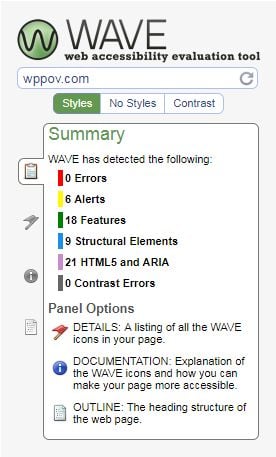
So, it should certainly be practical to make a reasonably accessible WP site. But how accessible are mine? After testing, I think not quite perfect but pretty good. Keyboard navigation seems to work fine. This site passes the WAVE accessibility checker from WebAIM with no errors – though the checker does offer some suggestions for improvements, i.e. ‘Alerts’. My results are not too much worse than those of WebAIM’s site, or Joe Dolson’s.


All that being said, if I were making a site that had to be fully compliant with WCAG 2.0 accessibility guidelines, I would use flat html, not WP or another CMS. I would probably use a text editor like NotePad++. It would be a visually hum-drum site, because I’m not very good at html, but I could control every aspect of the design.